
A fast CI/CD feedback loop is essential for developer productivity. When tests fail, you need to know immediately - and you need to access the results without friction. Gaffer delivers test results directly to Slack, cutting your feedback loop from minutes to seconds.
The CI/CD Feedback Loop Problem
Every developer knows this frustrating workflow:
- Push code and wait for CI to run
- Notice the build failed (eventually)
- Navigate to GitHub/GitLab to find the workflow
- Scroll through logs trying to find the failure
- Download artifact zip files
- Extract and open locally to see the actual report
This process takes 5-10 minutes every time a test fails. Multiply that by the number of failures per day, and you’re losing hours to CI archaeology.
The worst part? By the time you’ve found the failure, you’ve lost your mental context. You’ve context-switched to Slack, email, or another task. Getting back into flow takes even more time.
How Gaffer Improves Your CI/CD Feedback Loop
Gaffer shortens your feedback loop to a single Slack notification with a direct link to the full test report.
Instant Slack Notifications
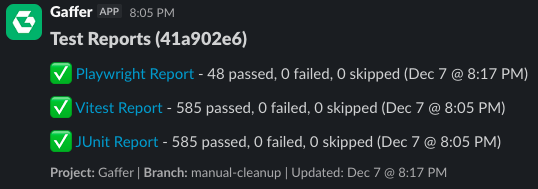
When your CI pipeline finishes, Gaffer sends a notification to your configured Slack channel:
- Pass/fail summary at a glance
- Direct link to the full HTML report
- Branch and commit context so you know exactly what triggered it
- Failure details with test names and error snippets
Smart Notification Filtering
You won’t get spammed. Gaffer lets you configure exactly when to notify:
- All runs - Get notified on every test run
- Failures only - Only hear about problems
- Consecutive failures - Alert after multiple failures in a row, filtering out one-off noise
- Branch filtering - Only notify on
main,release/*, or specific branches
One-Click Access to Full Reports
Click the link in Slack and you’re looking at the full test report - no downloads, no zip files. The report is hosted and shareable with your entire team.
Real Impact on Developer Velocity
| Before Gaffer | After Gaffer |
|---|---|
| 5-10 min to find failure details | 10 seconds from notification to report |
| Context switch to CI provider UI | Stay in Slack, click one link |
| Scattered across CI runs | Centralized, searchable history |
| Manual log parsing | Structured HTML reports with filtering |
Setting Up Your CI/CD Feedback Loop
Getting started takes less than 5 minutes:
1. Add the Gaffer Upload Step
- name: Upload to Gaffer uses: gaffer-sh/gaffer-uploader@v2 with: api-key: ${{ secrets.GAFFER_UPLOAD_TOKEN }} report-path: ./test-results2. Connect Slack
In your Gaffer project settings, click “Connect to Slack” and authorize the integration.
3. Configure Notifications
Choose which channel to notify, which branches to monitor, and when to send alerts.
That’s it. Your next CI run will notify your team automatically.
Beyond Notifications: Full Test Analytics
A faster feedback loop is just the start. Gaffer also provides:
- Pass rate trends - Track test health over time
- Flaky test detection - Identify tests that fail intermittently
- Duration tracking - See which tests are getting slower
- Historical comparison - Compare test runs across commits and branches
Want more control over when and how you get notified? See Test Failure Notifications for details on triggers, branch filtering, and webhook integrations.
Get Started
Gaffer’s free tier includes Slack integration with 500 MB of storage and 7-day retention. Connect your first project in under 5 minutes.