
GitHub launched Agentic Workflows on Feb 13 — markdown files that compile into GitHub Actions YAML, with an AI agent as the runtime. You write instructions in plain English, point the agent at tools, and it runs on a schedule or in response to events. We set one up on Gaffer’s repo to do weekly test suite reviews using our own MCP server.
What Agentic Workflows Are
The idea: instead of writing YAML pipelines that run shell commands, you write markdown files that tell an AI agent what to do. The agent gets tools (GitHub API, MCP servers, bash) and safe-outputs (capped write operations like creating issues or PRs).
The workflow files live in .github/workflows/ as .md files with YAML frontmatter for configuration and markdown body for instructions. You install the gh aw CLI extension, write your workflow, and run gh aw compile to generate a .lock.yml file — a standard GitHub Actions workflow that sets up the agent runtime, installs tools, and runs your instructions. Engines include Copilot, Claude Code, and Codex.
The part that matters for test analytics: MCP servers run in sandboxed isolation inside the workflow. The agent can call MCP tools the same way it would in a local IDE session.
The Workflow We Built
We wanted a weekly test health review that creates a GitHub issue with findings. Here’s the full workflow:
---on:  schedule: weekly on monday
permissions:  contents: read  issues: read
engine: copilot
tools:  github:    toolsets: [repos, issues]    read-only: true
mcp-servers:  gaffer:    command: "npx"    args: ["-y", "@gaffer-sh/mcp@latest"]    env:      GAFFER_API_KEY: "$\{{ secrets.GAFFER_API_KEY }}"
safe-outputs:  create-issue:    max: 1
---
# Weekly Test Suite Health Review
Review the test suite health for the Gaffer dashboardproject and create an issue summarizing findings.
## Instructions
1. Use the Gaffer MCP server to analyze the test suite:   - Call `get_project_health` for an overview   - Call `get_flaky_tests` to identify unreliable tests   - Call `get_failure_clusters` on the most recent     failed run to group failures by root cause   - Call `get_slowest_tests` for performance bottlenecks
2. Create a GitHub issue with:   - Overall test health (pass rate, flaky count)   - Top 5 flakiest tests with flip rates   - Failure clusters with representative errors   - Recommended actions
mcp-servers block. This is where the agent gets access to Gaffer. The command + args pattern is the same as configuring MCP in Claude Code or Cursor — npx -y @gaffer-sh/mcp@latest with an API key from secrets.
safe-outputs. The agent can create at most 1 issue. It can’t push code, merge PRs, or do anything outside the declared outputs. This is how agentic workflows handle the “agent running unsupervised” problem.
schedule: weekly on monday. Fuzzy scheduling — GitHub scatters execution times to avoid thundering herd. The syntax is deliberately readable rather than cron-precise.
The MCP Integration
The agent picks up the Gaffer MCP server and has access to 15 tools — the same ones you’d get in a local IDE session: get_flaky_tests, get_failure_clusters, get_test_history, compare_test_metrics, get_slowest_tests, and so on.
The key difference from a custom GitHub integration: the agent doesn’t need custom code to query test analytics. The MCP protocol means the same server that works in Claude Code works in an agentic workflow — no adapter, no wrapper, no GitHub-specific integration to maintain.
The workflow instructions are just English descriptions of what to look for:
- Call `get_flaky_tests` to identify unreliable tests, sorted by flakinessScore- Flag any test with a flakinessScore above 0.5 as high priority- Note failure clusters with 3+ tests sharing a root causeThe agent translates these into the right MCP tool calls, processes the structured JSON responses, and formats findings into a GitHub issue.
Why Agentic Workflows for Test Analysis
There are simpler ways to get a weekly test health summary. You could write a script that queries an API and formats a report. The tradeoffs that pushed us toward an agentic workflow:
Judgment calls. A script reports data. An agent can triage: “this flaky test has a 0.72 flakinessScore and has been flipping for two weeks — consider skipping it.” The agent contextualizes the data based on the instructions you give it.
Adaptive analysis. If get_failure_clusters returns a cluster with 8 tests sharing a database connection error, the agent can decide to call get_test_history on those specific tests to check if this is a new pattern. A static script follows a fixed path.
Structured data matters more here. An agent working with raw CI logs would spend most of its context window parsing text. With MCP tool calls returning typed JSON — flip rates, flakiness scores, cluster counts — the agent spends its capacity on analysis instead of parsing.
Debugging the First Run
The first run surfaced two problems, both related to running with a project-scoped token (gfr_) instead of a user API key.
First, the agent called list_projects as its opening move — which errored, because project tokens are scoped to a single project and don’t support listing. Every tool description said “Use list_projects first to find project IDs,” so the agent followed the instructions literally. The fix: make tool descriptions token-aware. When the server detects a project token, it omits list_projects from the tool list and tells the agent that projectId resolves automatically.
Second, the agent couldn’t call get_failure_clusters, get_slowest_tests, or coverage endpoints — because those routes only accepted user API keys. The agent got auth errors and had to skip the detailed analysis entirely. The fix: we unified the auth layer so project tokens can access all project-scoped read endpoints. The server validates that the token’s project matches the URL, but otherwise treats both token types the same.
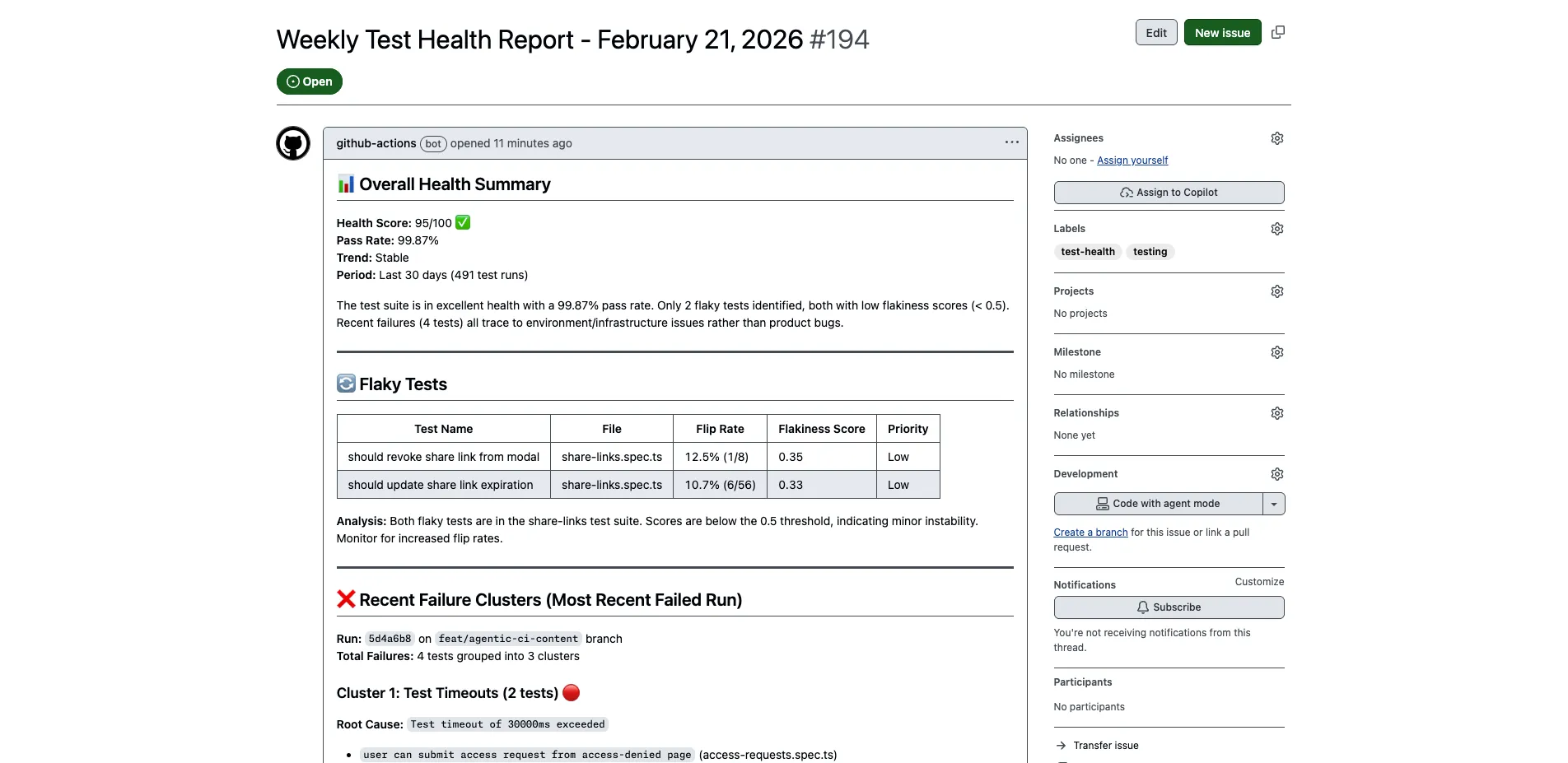
After both fixes, the agent completed the full analysis in under 5 minutes: health overview, flaky test detection, failure clustering by root cause, and slowest test profiling — all written up as a GitHub issue with prioritized recommendations.
Setup
If you want to do something similar:
-
CI uploads test results to Gaffer. Add the Gaffer uploader to your pipeline. This is the prerequisite — the MCP server queries data that your CI uploads.
-
Install the CLI.
gh extension install github/gh-awandgh aw initin your repo. -
Create your workflow. Copy the markdown above, adjust the instructions for what you care about. Maybe you want daily failure analysis instead of weekly health reviews. Maybe you want it to trigger on PR events and check if new code introduced flaky tests.
-
Set secrets.
GAFFER_API_KEYfor the MCP server, plus the engine token (Copilot, Anthropic, or OpenAI depending on which engine you use). -
Compile and push.
gh aw compilegenerates the lock file, then commit both files.
The MCP server is the same one you’d use locally — npx -y @gaffer-sh/mcp@latest. There’s no separate “CI version” or GitHub-specific setup. See the MCP server docs for the full tool list and configuration options.
Related
- Your AI Agent’s Missing Layer: Test Intelligence — How structured test data helps agents make better decisions
- Dogfooding Gaffer’s MCP Server to Fix Slow Playwright Tests — Using the MCP server on our own test suite
- Test Memory for AI Agents — Solutions page on structured test history via MCP