
HTML test reports exist because developers want more than console output. Playwright gives you screenshots, traces, and video. pytest-html gives you an interactive summary. But these reports are local files, and there’s no built-in way to host them where your team can access them.
The Hosting Problem
HTML reports are designed for browsers, but they’re generated on CI runners or local machines. Your team can’t view them without extra steps:
Common (Bad) Solutions
Email the zip file
Zip up the report folder, email it, hope the recipient extracts it and opens index.html. Works, but feels like 2005.
Upload to S3 manually
Set up a bucket, configure permissions, upload after each run, manage cleanup. That’s infrastructure work just to share a test report.
Rely on CI artifacts
GitHub Actions and GitLab CI store artifacts, but:
- Viewing requires downloading and extracting a zip
- Finding the right artifact in dozens of workflow runs is tedious
- QA might not have CI access
- Artifacts expire (30-90 days depending on the CI system)
Share your screen
Works for live debugging. Can’t reference it later. Not async-friendly.
Better: Hosted HTML Reports with Shareable Links
Upload your HTML reports after every CI run. Every report gets a permanent URL that opens directly in the browser — no downloads, no extraction, no CI access required.
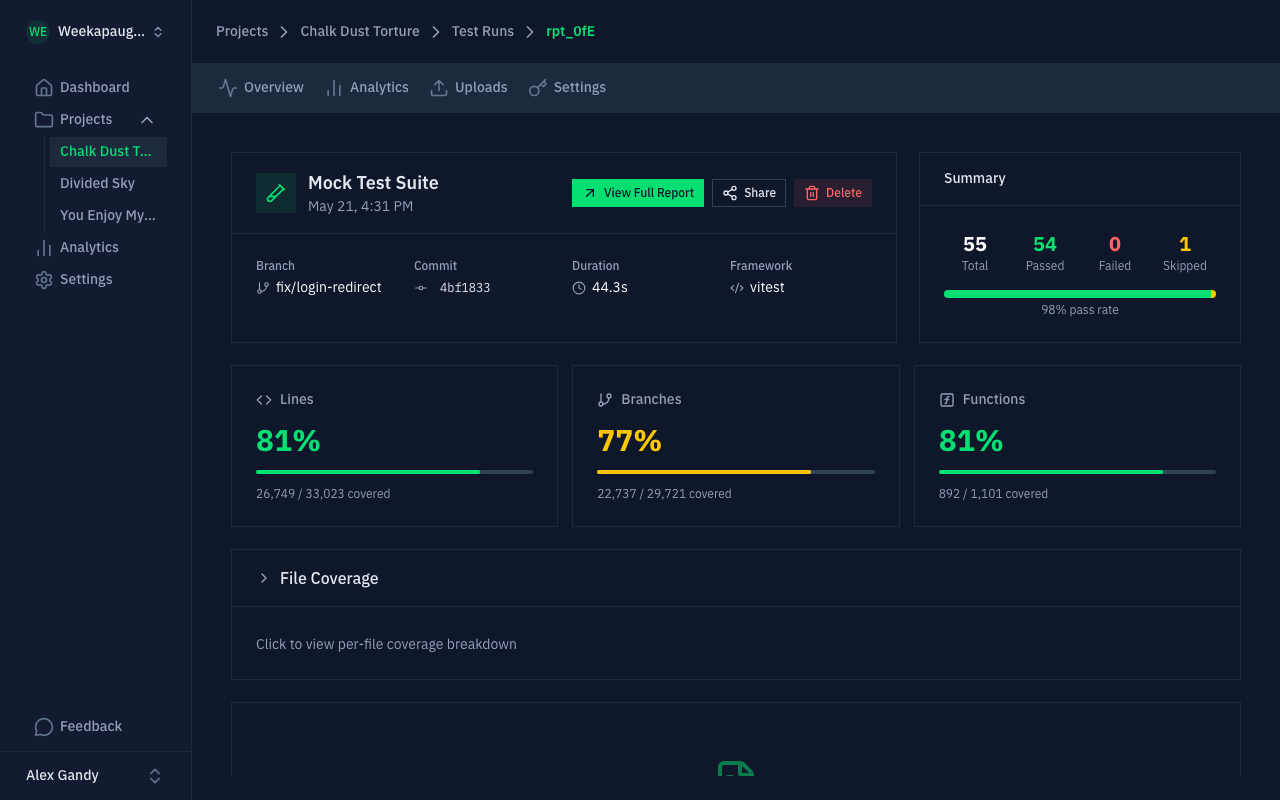
What This Looks Like
- CI runs your tests and generates the HTML report (unchanged)
- One upload step sends the report to Gaffer
- You get a URL like
https://app.gaffer.sh/reports/abc123 - Share it in Slack, GitHub PRs, Jira, anywhere
- Anyone with access sees the full interactive report in their browser
Need to share with someone outside your organization? Generate a public share link with an expiration you control: recipients view the HTML report directly in their browser without needing an account.
Setting Up HTML Report Hosting with Gaffer
Step 1: Generate Your Report (Unchanged)
Use whatever reporter your framework provides:
# Playwrightnpx playwright test --reporter=html
# pytestpytest --html=report.html --self-contained-html
# Cypress (with mochawesome)npx cypress run --reporter mochawesome
Step 2: Upload in CI
GitHub Actions:
- name: Run tests  run: npx playwright test --reporter=html
- name: Upload report to Gaffer  if: always()  uses: gaffer-sh/gaffer-uploader@v2  with:    gaffer_upload_token: ${{ secrets.GAFFER_PROJECT_TOKEN }}    report_path: ./playwright-report
Step 3: Share the Link
Share the URL in Slack, add it to a GitHub PR comment, attach it to a Jira ticket. Recipients see the full interactive report in their browser.
HTML Reports + Structured Data
HTML reports are great for humans, but you also want structured data for analytics: pass/fail trends, duration tracking, flaky test detection. Most frameworks can output both:
export default defineConfig({ reporter: [ ['html', { open: 'never' }], // For humans ['json', { outputFile: 'results.json' }] // For analytics ],});# pytestpytest --html=report.html --junitxml=results.xmlUpload both formats. Gaffer serves the HTML for viewing and parses the structured data for trend analytics.
Slack and Webhook Notifications
Get notified when tests finish instead of checking CI manually:
- Pass/fail summary posted to your Slack channel
- Direct link to the hosted HTML report
- Filter by branch: only notify on
main, skip feature branches - Webhooks for custom integrations
Comparing Your Options
| Solution | HTML Viewing | Shareable Link | Automated | Analytics |
|---|---|---|---|---|
Local open report.html | Native | No | No | No |
| Email zip file | After extraction | Awkward | Manual | No |
| CI artifacts | Download required | With CI access | Built-in | No |
| S3 + CloudFront | Native | Yes | DIY | No |
| Gaffer | Native | Yes | Yes | Yes |
Get Started
This page covers HTML output specifically. The same workflow hosts test reports in any format Gaffer parses. Gaffer’s free tier includes 500 MB of storage with 7-day retention. Paid plans offer up to 90-day retention.