
A test fails on main, you re-run the pipeline, and it passes. You know flaky tests are eating your team’s time, but you can’t name the specific tests doing the damage. CI artifacts expire before patterns emerge, retries hide which tests are actually unstable, and nobody has time to keep a spreadsheet. The missing piece is persistent pass/fail history per test.
What is a flaky test?
A flaky test is an automated test that produces inconsistent results without any code change: it passes on one run and fails on the next under the same conditions. Flaky tests are distinct from legitimate test failures. A real failure means the code is broken. A flaky test means the test itself is unreliable, typically due to timing dependencies, shared state, or external service calls. A suite with a high proportion of flaky tests trains engineers to ignore red builds, which is how real regressions slip through.
The Flaky Test Detection Problem
Most teams experience flakiness without being able to fix it because the data needed to identify the specific bad tests is gone by the time anyone goes looking.
- Re-runs mask the signal. A test that passes on attempt 2 looks identical to a test that passed on attempt 1.
- CI artifacts expire. GitHub Actions defaults to 90 days, GitLab to 30. By the time a pattern is obvious, the underlying runs are gone.
- No history per test. Build pages show “this run.” Nobody shows “this test, last 50 runs.”
- Retry configs lie.
retries: 2keeps the build green and tells you nothing about which tests needed the retry. - Quarantine has no exit criteria. Tests get
.skip’d, then forgotten. Coverage rots.
Common (Bad) Solutions
1. Manual re-run tracking
- Slack channel for “this failed but passed on rerun”
- Falls apart at >2 engineers; nobody catches the trends
2. Retry everything
retries: 3in CI keeps builds green- Hides root cause, doubles or triples build time, masks regressions
3. Spreadsheets
- Someone updates a sheet with flaky tests after each red build
- Dies in week three when that engineer goes on vacation
4. Reading CI artifacts manually
actions/upload-artifactkeeps reports for 90 days- Finding the right artifact across hundreds of runs is its own job
Better Solution: Flip-Rate Analysis Across Runs
The metric that actually identifies flaky tests is flip rate: how often a test transitions between pass and fail across consecutive runs. A test that stays passing is stable. A test that flips constantly is the one wasting your time.
Flip Rate = (number of pass/fail transitions) / (total runs - 1)A test with results [pass, fail, pass, fail, pass] has 4 flips across 5 runs, or 80%.
| Flip Rate | Interpretation |
|---|---|
| 0–10% | Stable test |
| 10–30% | Moderately flaky, worth investigating |
| 30–50% | Severely flaky, fix immediately or quarantine |
| 50%+ | Random; remove from the build until rewritten |
Flip rate only works with persistent history. A single run cannot tell you anything. A handful of runs cannot either: Gaffer requires at least 5 runs before evaluating a test, to keep a single bad run from poisoning the score.
Detecting Flaky Tests with Gaffer
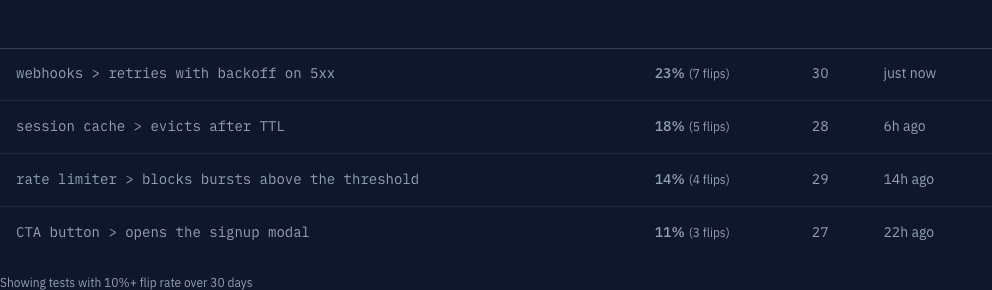
Gaffer stores every test result and computes flip rate per test, per branch, automatically.
- Flip rate: transitions per run, last 30 days
- Flip count: total pass/fail transitions observed
- Total runs: sample size, so you know whether to trust the score
- Last seen flaky: when the most recent flip happened
- Branch filter: separate
mainflakiness from feature-branch noise
No new test framework to adopt, no annotation to add. If your CI already produces JUnit XML, CTRF, Playwright HTML, Jest JSON, or pytest output, Gaffer ingests it and starts the count.
Threshold defaults to 10% flip rate before a test is flagged. Tune it higher if your suite is noisy and you want to focus on the worst offenders first.
Setting Up Flaky Detection in CI
One step in your CI pipeline. Test results upload, Gaffer parses them, flaky detection happens server-side.
- name: Run tests  run: npx playwright test --reporter=junit  env:    PLAYWRIGHT_JUNIT_OUTPUT_NAME: test-results/junit.xml
- name: Upload to Gaffer  if: always()  uses: gaffer-sh/gaffer-uploader@v2  with:    gaffer_upload_token: ${{ secrets.GAFFER_PROJECT_TOKEN }}    report_path: ./test-results/junit.xml
Gaffer supports multiple test frameworks (Jest, Vitest, pytest, Mocha, and more) with the same setup: emit a JUnit XML or CTRF JSON, point the uploader at it, done. Full setup per CI provider lives in the CI guides.
Fixing Flaky Tests Once You’ve Found Them
Detection is the hard part. Once you have a list of specific tests with high flip rates, the fixes are mostly mechanical. For deeper background, see how to manage flaky E2E tests and how much flaky tests are actually costing your team.
Quarantine first, fix second
Don’t let a flaky test block the build while you investigate. Move it to a separate suite that runs but doesn’t gate merges. Set a calendar reminder; quarantine without an exit date is just deletion.
// Jest example: skip with a tracking issuetest.skip('checkout flow: flaky, see #4127', () => { // ...});Replace arbitrary waits with explicit conditions
// Bad: fixed timeout, hopes the page is readyawait page.waitForTimeout(2000);
// Good: wait for the specific thing you're testingawait page.waitForSelector('[data-testid="loaded"]');
Mock external dependencies
Network calls are the single largest source of flakiness in E2E suites. Mock the API at the test boundary; let an integration test exercise the real call.
await page.route('**/api/data', route => { route.fulfill({ json: mockData });});Reset shared state per test
beforeEach(() => { jest.clearAllMocks(); db.reset();});Run in random order to surface order dependence
jest --randomizeComparing Flaky Test Detection Approaches
| Method | History per test | Identifies which tests | Branch-aware | Setup |
|---|---|---|---|---|
| Re-run, hope, repeat | None | ✕ | ✕ | None |
| Manual spreadsheet | Manual | ~ (whoever’s tracking) | Manual | Hours/week |
| CI artifact archaeology | 30–90 days | ~ (if you click through) | ✕ | None |
| Retry configs | None | ✕ | ✕ | One line |
| Gaffer | Up to 90 days | ✓ flip rate per test | ✓ | One CI step |
What Comes With Detection
Once test history is hosted, the analytics that depend on it come along: pass-rate trends, duration regressions per test, failure clustering to group related failures automatically, and a health score that combines them. When you need to dig into why specific tests are failing, failure analysis gives you the full breakdown. Gaffer can also post a Slack message the moment a new flaky test crosses your threshold.
Who Uses Flaky Test Detection
Small teams and OSS projects who can’t justify dedicated test-infrastructure engineers but still want to know which 10 tests in a 2,000-test suite are responsible for half the red builds.
Free tier covers 500 MB storage with 7-day retention. Paid plans extend to 90 days, which is usually long enough for the worst flakiness patterns to surface.