
Microsoft’s @playwright/mcp shipped four versions in eight days (v0.0.72 on April 30 through v0.0.75 on May 7, 2026), v0.0.73 started auto-publishing to the MCP Registry on every release, and the install in Claude Code is a one-liner. The setup half is solved. The unsolved half is what happens after the test runs: the agent has no memory of the suite across runs, no way to read failure clusters from CI, and no answer to “is this flaky or actually broken?”
This post walks through both halves. The first is fast. The second is where most of the work lives.
What Playwright MCP gives Claude Code
Playwright MCP is a Model Context Protocol server published by Microsoft. It exposes a real Chromium (or Firefox/WebKit) browser as a set of tools the agent can call: navigate, click, fill a form, evaluate JavaScript, take a snapshot of the accessibility tree, capture a screenshot.
The important thing is that the agent gets the page as structured data, not as a screenshot. Claude doesn’t have to OCR a button label out of pixels. It calls browser_snapshot, gets back the accessibility tree, and reasons about the DOM directly. That’s why this works at all.
Browser as a tool, not a screenshot
A vision-only loop (screenshot in, click coordinate out) is brittle. Layout shifts, retina vs. non-retina, dark mode, unexpected modals: every visual change breaks the agent’s coordinate guesses. The accessibility-tree approach sidesteps all of that. The agent reads role names and labels, the same surface a screen reader would consume.
For Claude specifically, this is a much better fit than wiring up vision. Token-cheap, deterministic, replayable.
How it differs from npx playwright test
npx playwright test runs a suite of pre-written specs against a headless browser and produces a report. Playwright MCP runs the browser interactively under the agent’s control. There is no spec file. The agent decides the next action based on the current page state.
You still need npx playwright test for CI. Playwright MCP doesn’t replace your suite. It gives the agent a way to drive the app itself, the way a human QA engineer would, when the agent is reproducing a bug or self-checking a fix before pushing.
The browser_run_code_unsafe rename
In v0.0.72 (April 30, 2026), Microsoft renamed the browser_run_code tool to browser_run_code_unsafe. Same behavior, blunt name. The _unsafe suffix is the project signaling a position: arbitrary code execution inside the controlled browser is something the agent should opt into deliberately, not call by reflex.
Microsoft is hardening the boundary of what the MCP will do. The server controls a browser; it doesn’t run your test suite, remember CI history, or classify failures. Those parts live elsewhere.
Install Playwright MCP in Claude Code
One command:
claude mcp add playwright npx @playwright/mcp@latestThat registers the MCP server in your Claude Code config, pinned to whatever @latest resolves to at install time. Re-run it to bump.
If you want to lock to a specific version:
Verify the install
Start a Claude Code session and run /mcp. You should see playwright in the list, status connected, with around two dozen tools registered (browser_navigate, browser_click, browser_snapshot, browser_run_code_unsafe, and friends).
If the server fails to start, the most common cause is that the Playwright browser binaries haven’t been installed yet:
npx playwright install chromiumThat’s the same step you’d run for a regular Playwright project. The MCP server uses the same browser cache.
Optional: storage state for authenticated apps
If your app requires login, you don’t want the agent re-doing the auth flow on every action. Generate a storage state file once with regular Playwright:
npx playwright codegen --save-storage=auth.json https://app.example.com/loginThen point the MCP server at it via the --storage-state flag in your Claude Code MCP config. The agent now starts every session already logged in.
How to use Playwright MCP with Claude Code
After install, just ask. A first-session example:
Open
http://localhost:5173/login, sign in with[email protected]/password, then verify the dashboard shows my four most recent test runs.
Claude calls browser_navigate, browser_snapshot to read the form, browser_fill for the inputs, browser_click on the submit button, and another browser_snapshot to read back the dashboard. It reports what it saw. That’s the loop, end to end, for a single interaction.
This is fine for a single page check. It does not scale to “did my changes break anything in the suite?” That’s where the second half comes in.
Why one MCP isn’t enough
The agent loop is two-sided. Playwright MCP scopes the first side: current state, this run, this browser. The second side is historical state: the suite over time, what’s flaky, what’s regressing, what failure cluster you’re staring at right now.
Here’s the loop drawn out:
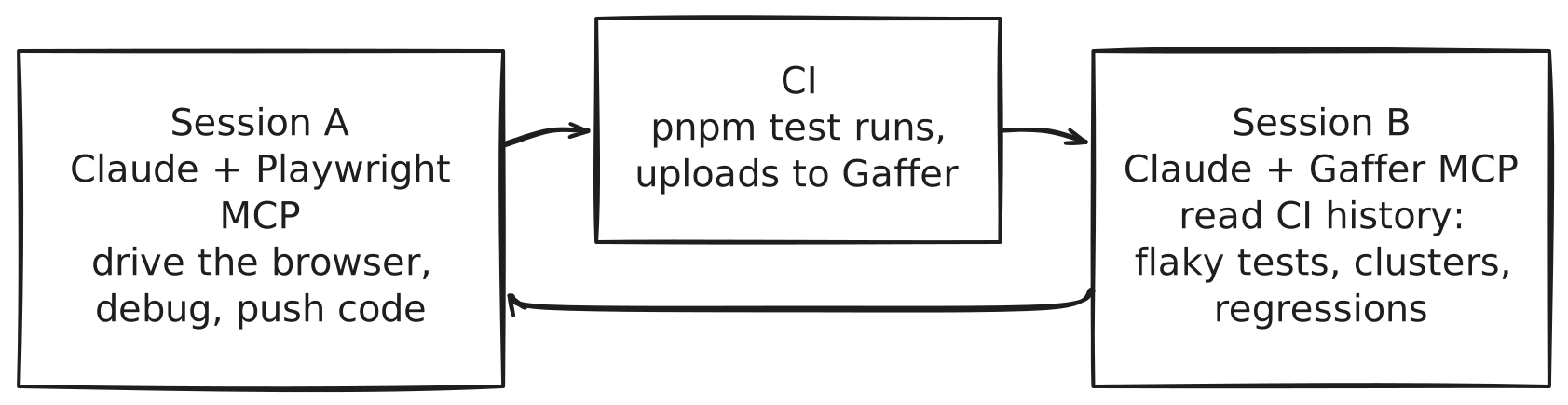
Two MCPs, one loop. The first gives the agent eyes and hands. The second gives it memory. Without the second one, every CI failure looks new. The agent re-investigates flaky tests it already triaged last week, re-applies fixes that already failed in production, and treats a 200-failure run as 200 problems instead of three or four.
The agent loop in practice
Step 1: Claude drives the browser (Playwright MCP)
Working on a feature locally. Claude makes a code change, then drives the browser through the new flow to self-check before pushing:
Open
localhost:5173, click “New project”, fill the name with “smoke”, and check that the project shows up in the sidebar.
Six tool calls, one read-back, done. This catches obvious regressions before CI even runs. It doesn’t catch anything the agent didn’t think to check.
Step 2: Claude runs the full suite
Run
pnpm testand wait for the results.
That’s a regular bash tool call, no MCP magic. The suite runs locally or, more interestingly, in CI after a push. The CI pipeline uploads the results to Gaffer (one extra step in the GitHub Actions workflow, takes a few seconds). At this point the agent’s session has typically ended. The data is parked in CI history, waiting.
Step 3: Claude reads back the results (Gaffer MCP)
The next session, the agent picks up where the last one left off. Without test-result memory, it would have to re-read CI logs from scratch. With Gaffer MCP, it asks structured questions:
gaffer:get_project_health(projectId: "gaffer-dashboard")A real response, pulled from Gaffer’s own dogfood window (last 14 days against the dashboard’s own test suite):
{ "healthScore": 95, "passRate": 99.95, "uploadsLast14d": 173, "flakyTestCount": 4, "trend": "stable"}That’s the headline. Pass rate 99.95% across 173 uploads in two weeks, four flaky tests, health score 95. Useful as a top-of-session pulse check, and the agent now knows the suite isn’t on fire before it starts work.
For the actual triage, the relevant tools are get_failure_clusters, get_flaky_tests, get_slowest_tests, and get_test_history. Each one answers a question the agent would otherwise have to reconstruct from raw CI logs.
get_failure_clusters groups today’s failures by error similarity. Twelve failed tests with the same error message are one bug, not twelve. The agent fixes one thing.
get_flaky_tests returns tests with high flip rates, ranked by a flakiness score. A test that’s flipped four times in 14 days is a quarantine candidate, not a code change candidate.
get_slowest_tests surfaces p95 duration outliers. If a test took 3s last month and takes 30s this week, that’s a regression even though it’s still passing.
get_test_history returns the pass/fail record for a specific test across recent runs. The single most useful question an agent can ask before “fixing” a failing test is: did this test pass on main last week? If yes, the regression is recent and probably caused by code that landed since. If no, the test has been broken longer and the agent’s current change isn’t the cause.
The full tool inventory and install instructions live at /docs/mcp/.
Step 4: Claude decides what to fix next
Now the agent has structured signal instead of a wall of stderr. The decision tree gets shorter:
get_failure_clustersreturns three tests in the same file sharing one error string → one real bug, fix it.get_flaky_testsincludes one of those tests, flipped four times in the last 14 days → quarantine, not fix. The agent skips it and moves on.get_test_historyshows a fourth test failed only on the latest commit, after passing on the previous fifty → recent regression, probably caused by the agent’s last change. Roll back or patch.get_slowest_testsshows nothing new at the top of the list → no performance regression to chase right now.
Four data points, four different decisions. None of those decisions are reachable from a CI logs dump. They require structured history. That’s what the second MCP carries.
For more on the “should an agent fix this or quarantine it?” question, the flaky test detection page walks through the classification logic, and the failure clustering page covers the grouping algorithm. The companion piece Give Your AI Coding Tools Access to Your Test Results goes deeper on the structured-data argument generally, with examples for Cursor and Windsurf alongside Claude Code.
Use cases that work today
Self-QA on a local branch
You’ve made a change, you want to know if you broke the obvious flows. Claude drives the browser through three or four happy paths, reports back. Playwright MCP alone is enough. No CI involvement.
Reproducing a CI failure locally
A test failed in CI. You don’t want to wait for another full CI run to verify your fix. Ask Gaffer MCP for the failed test’s history and the failure cluster it belongs to. Then ask Playwright MCP to drive that exact flow against your local branch. The first MCP scopes the bug. The second one reproduces it.
Triaging a 200-failure CI run
Migration day. A flag flip cascades. Everything is red. Ask get_failure_clusters first. Two hundred failures collapse into four root causes. Ask get_test_history on a representative test from each cluster to confirm whether the cause is recent or pre-existing. Now the agent has a 4-item to-do list instead of a 200-item one. This is where the second MCP earns its keep.
Setting up the second half: install Gaffer MCP
Same pattern as Playwright MCP, one command:
claude mcp add gaffer -e GAFFER_API_KEY=gaf_your_api_key -- npx -y @gaffer-sh/mcpGet the API key from Account Settings > API Keys in the Gaffer dashboard. The key looks like gaf_… and is scoped to your account. Project tokens (gfr_…) also work and are preferable for CI.
Verify with /mcp again. You’ll see gaffer in the list, with get_project_health, get_flaky_tests, get_failure_clusters, get_slowest_tests, get_test_history, and a dozen more registered.
The prerequisite is that your CI is uploading test results to Gaffer. If you’re not there yet, the GitHub Actions guide is one workflow step. The full MCP reference, including every tool’s schema, is at /docs/mcp/.
Troubleshooting
Tools disappear mid-session
Claude Code occasionally drops MCP server connections after long idle periods. The fix is /mcp restart playwright (or gaffer). If it persists, the underlying npx process probably crashed. Check ~/.claude/logs/ for the stderr output.
Claude can drive the browser but doesn’t know the suite passed
This is the canonical symptom of running Playwright MCP without a result-memory MCP. The agent thinks the work is done because the page it just clicked through looks correct. Meanwhile the unit tests it didn’t touch are red. Install Gaffer MCP (or any equivalent that exposes structured CI history) and ask the agent to call get_project_health before declaring victory.
Node version mismatches
@playwright/mcp requires Node 18+. If claude mcp add succeeds but the server fails to start, check node -v. Older versions of npx will silently fall back to deprecated APIs.
Browser binaries missing
npx playwright installSame as a fresh Playwright project. The MCP server doesn’t bundle browsers; it uses the cache the regular Playwright CLI populates.
FAQ
What is Playwright MCP vs the Playwright CLI?
Playwright CLI runs pre-written specs against headless browsers in CI. Playwright MCP exposes browser actions as tools an AI agent can call interactively. Both use the same underlying browser engines. CLI is for your suite. MCP is for the agent.
Can Claude Desktop use Playwright MCP too?
Yes. The MCP config format is slightly different (JSON via Settings > MCP Servers), but the same @playwright/mcp package works. The interactive workflows differ a bit because Claude Desktop doesn’t have a built-in shell tool, so the “run npm test and read back results” leg of the loop is harder. Claude Code is a better fit for the full agentic test loop.
Which AI tool is best for Playwright MCP automation?
Honest answer: it depends on what else the agent has to do. For pure browser automation, Cursor and Claude Code both work fine. For the full loop in this post (browser drive, then CI, then result read-back, then iteration), Claude Code’s bash tool and longer-running session model are a better fit. We’ll cover the Cursor variant in a follow-up.
What is an MCP server for Playwright?
A program that speaks Model Context Protocol and exposes Playwright’s browser-control APIs as agent tools. @playwright/mcp is Microsoft’s implementation. It’s the canonical one. Other implementations exist but the registry-published Microsoft package is what you want.
How does this work with CI agents like Claude Code Action or gh-aw?
The same way it works locally, with one twist: the agent runs as part of the workflow, so it has fewer “between sessions” gaps. We wrote up the full pattern in GitHub Agentic Workflows: Automated Test Reviews with MCP, where a scheduled gh-aw workflow uses Gaffer MCP to do a weekly test health review and file a GitHub issue with findings. The MCP server is identical to the local one (npx -y @gaffer-sh/mcp@latest); the runtime swaps from your editor to a sandboxed CI runner.
Two MCPs to close the loop: Playwright MCP for eyes and hands, Gaffer MCP for memory. Microsoft’s @playwright/mcp is the canonical browser-side install.