
Your PR has 3 green checkmarks and 1 red X. You click the red X, land on a workflow run page, expand the test job, scroll through 200 lines of output, and finally find the failing test. Why is seeing test results in GitHub so hard?
The GitHub Actions Test Results Problem
Every developer knows this workflow:
- Push code to PR
- Wait for CI to finish
- See a red X on the PR
- Click to see details
- Land on the workflow run page
- Click into the job
- Expand the test step
- Scroll through logs to find failures
Total time to see what failed: 2-5 minutes
And if you want the full test report? Download artifacts, extract the zip, open the HTML file. Good luck doing that on your phone when you’re away from your desk.
What You Actually Want
- See pass/fail on the PR (GitHub does this)
- See which tests failed without digging through logs
- Click directly to a readable report
- Share the report with QA who doesn’t have GitHub access
GitHub’s built-in features get you partway there, but not all the way:
| Feature | What It Does | Limitation |
|---|---|---|
| Status checks | Shows pass/fail | No details about which tests |
| Annotations | Shows failures inline | Limited to ~50, no full context |
| Job summaries | Markdown in Actions tab | Manual setup, buried in workflow |
| Artifacts | Stores reports | Requires download, expires |
The Solution: Commit Statuses with Report Links
The fix is simple: post a commit status that links directly to a hosted test report.
How It Works
Tests run in GitHub Actions ↓Results uploaded to Gaffer ↓Gaffer posts commit status to GitHub ↓PR shows: ✓ Gaffer / Vitest — 47 passed [Details →]What Developers See
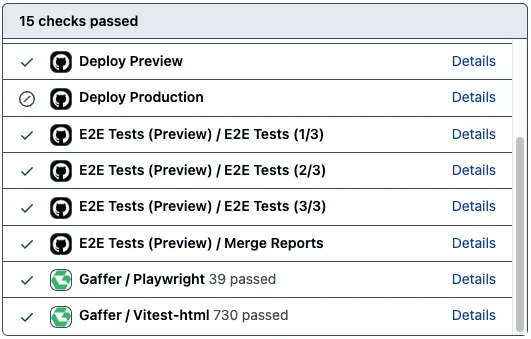
On your pull request, under the checks section:
✓ Gaffer / Playwright — 23 passed Details✗ Gaffer / Vitest — 45 passed, 2 failed DetailsClick “Details” and you’re taken directly to the full test report in Gaffer. No logs, no artifacts, no extraction.
What QA and PMs See
A simple link they can open in any browser:
https://app.gaffer.sh/r/abc123No GitHub access required. No downloading. Click and view.
Setting Up the Gaffer GitHub App
Step 1: Install the GitHub App
- In Gaffer, go to Settings → GitHub
- Click Install GitHub App
- Choose your GitHub organization or account
- Select which repositories Gaffer can access
Step 2: Link a Repository to Your Project
- Go to your project in Gaffer
- Navigate to Settings → GitHub
- Select your repository from the dropdown
- Enable Commit statuses
Step 3: Upload Results with Commit SHA
If you’re already uploading to Gaffer, just make sure you’re passing the commit SHA:
- name: Run tests  run: npm test
- name: Upload to Gaffer  if: always()  uses: gaffer-sh/gaffer-uploader@v2  with:    api-key: ${{ secrets.GAFFER_UPLOAD_TOKEN }}    report-path: ./test-results    commit_sha: ${{ github.sha }}    branch: ${{ github.ref_name }}
For pull requests, use the PR head SHA:
- name: Upload to Gaffer if: always() uses: gaffer-sh/gaffer-uploader@v2 with: api-key: ${{ secrets.GAFFER_UPLOAD_TOKEN }} report-path: ./test-results commit_sha: ${{ github.event.pull_request.head.sha || github.sha }} branch: ${{ github.head_ref || github.ref_name }}That’s it. The GitHub App handles posting the status automatically.
What the Status Looks Like
Gaffer posts commit statuses in this format:
Gaffer / {framework}For example:
Gaffer / Playwright- Your Playwright E2E testsGaffer / Vitest- Your Vitest unit testsGaffer / Jest- Your Jest tests
If you have multiple test suites, each gets its own status. At a glance, you can see which suite failed.
Comparison: Finding Test Results
| Approach | Time to Results | Click to Report | Works for QA |
|---|---|---|---|
| Check workflow logs | 2-5 minutes | No | No |
| GitHub Annotations | 30 seconds | No | No |
| Download artifacts | 1-2 minutes | After extraction | No |
| Gaffer commit status | 5 seconds | Yes, one click | Yes |
Beyond Status Checks
Once you have test results flowing through Gaffer, you also get:
Historical Context
See if this test has failed before. Was it flaky last week? The history is right there.
Flaky Test Detection
Tests that fail intermittently are flagged automatically. Know whether a failure is a real bug or just flakiness before you start debugging.
Slack Notifications
Get notified in Slack when tests fail, with a direct link to the report. No need to watch GitHub.
Cross-Repo Dashboard
If you have multiple repositories, see all your projects’ test health in one place.
Getting Started
Gaffer’s free tier includes 500 MB storage with 7-day retention - enough to try the GitHub integration on a real project. Commit statuses are included on all plans.