
Playwright generates beautiful HTML test reports, but sharing them with your team is surprisingly difficult. The reports are local files, CI artifacts expire, and emailing zip files feels like 2005. Here’s how to share Playwright test reports properly.
Viewing Playwright Reports Locally
When you run Playwright tests, the HTML report is generated locally in playwright-report/. To view it, run:
npx playwright show-reportThis starts a local server (default http://localhost:9323) and opens the report in your browser. You can pass a custom path if your report is in a different directory: npx playwright show-report ./custom-dir.
This works for viewing reports on your own machine. But sharing them with your team is a different problem.
The Playwright Report Sharing Problem
The local server from npx playwright show-report is only accessible on your machine. How do you share the report when:
- QA needs to see what failed before approving a release
- A PM wants to check test coverage for a feature
- You’re debugging with a colleague and need to show them the exact failure
- You need to reference an old test run from weeks ago
Common (Bad) Solutions
1. Email the zip file
- Clunky, fills up inboxes, version confusion
- Recipient has to download, extract, open in browser
2. Upload to S3/GCS manually
- Works, but requires manual steps every time
- Who manages the bucket? What about access control?
3. Rely on CI artifacts
- GitHub Actions artifacts expire after 90 days (configurable)
- GitLab artifacts expire too
- Finding the right artifact in a sea of workflow runs is tedious
4. Share your screen
- Not async-friendly
- Can’t reference later
Better Solution: Hosted Playwright Reports
The real solution is to host your Playwright reports on a dedicated platform. Every test run gets a unique URL that your team can access through the dashboard.
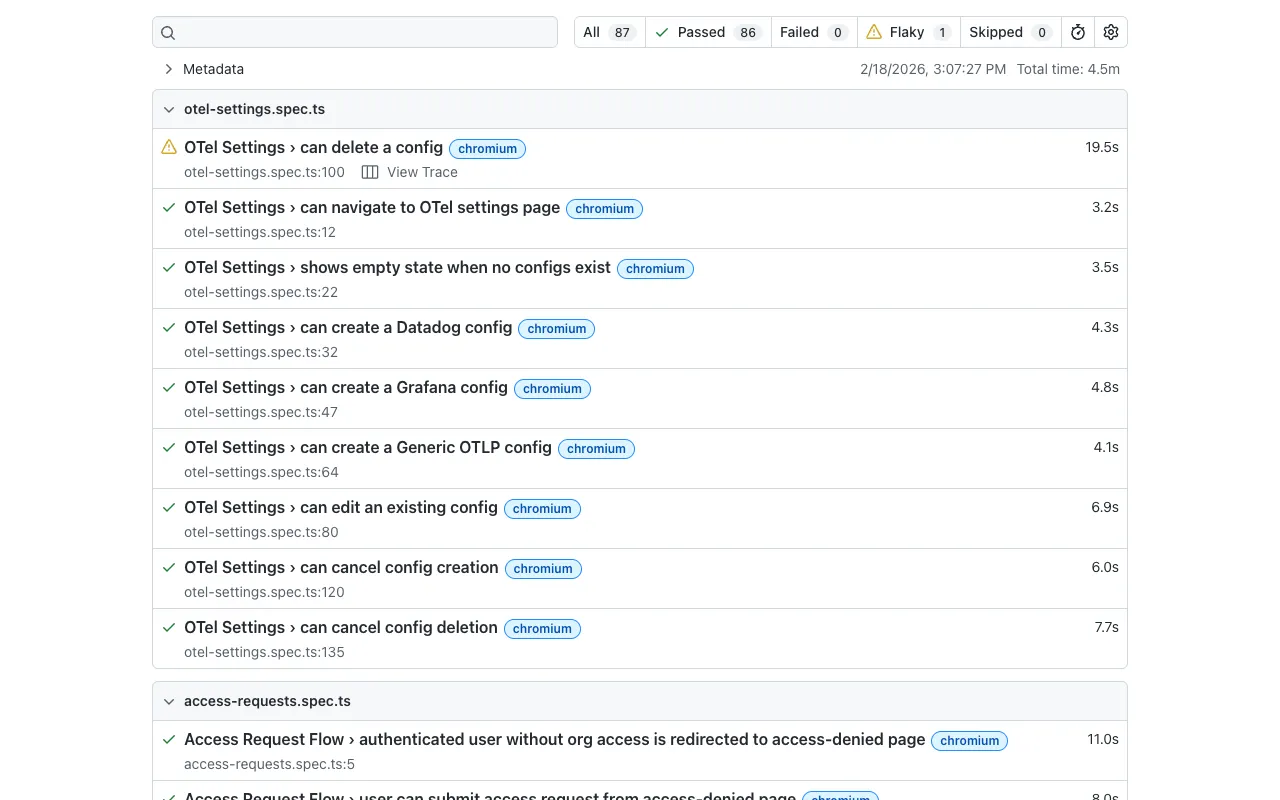
What Good Looks Like
- CI runs your Playwright tests
- Reports automatically upload to a hosting service
- You get a shareable URL like
https://app.gaffer.sh/reports/abc123 - Share the link in Slack, Jira, GitHub PR, wherever
- Anyone with access can view the full interactive report
No downloads. No manual steps. Configurable retention periods.
Sharing Beyond Your Team
Need to share a report with someone who doesn’t have a Gaffer account — a contractor, a stakeholder, or another team? Share links let you generate a public URL for any test run. Set an expiration (1 hour to 30 days, or never), and revoke the link when you’re done. Recipients see the full interactive Playwright report in their browser without needing to log in.
Setting Up Playwright Report Sharing with Gaffer
Gaffer hosts your Playwright reports with one addition to your CI pipeline.
Step 1: Generate Playwright HTML Reports
Make sure your playwright.config.ts generates HTML reports:
import { defineConfig } from '@playwright/test';
export default defineConfig({  reporter: [    ['html', { open: 'never' }],  // Generate HTML report    ['list'],                      // Also show in console  ],});
Step 2: Add Gaffer Upload to CI
GitHub Actions:
- name: Run Playwright tests  run: npx playwright test
- name: Upload report to Gaffer  if: always()  # Upload even if tests fail  uses: gaffer-sh/gaffer-uploader@v2  with:    api-key: ${{ secrets.GAFFER_UPLOAD_TOKEN }}    report-path: ./playwright-report
GitLab CI:
test: script: - npx playwright test after_script: - | curl -X POST https://api.gaffer.sh/upload \ -H "X-API-Key: $GAFFER_UPLOAD_TOKEN" \ -F "files=@playwright-report/index.html"Step 3: Share the Link
After upload, Gaffer returns a URL to the hosted report. Share it anywhere:
- Slack: “Tests failed on main, see report: [link]”
- GitHub PR comment: “E2E results: [link]”
- Jira ticket: Attach as evidence of testing
Bonus: Slack Notifications
Tired of checking CI manually? Gaffer can send test results directly to Slack:
- Pass/fail summary at a glance
- Direct link to the full report
- Filter by branch (only notify on
main, not every feature branch)
No more “did the tests pass?” messages in Slack.
Comparing Playwright Report Sharing Options
| Method | Retention | Shareable Link | Automated | Team Access |
|---|---|---|---|---|
Local show-report | None | ❌ | ❌ | ❌ |
| Email zip files | Manual | ❌ | ❌ | ✅ |
| CI artifacts | 30-90 days | ✅ | ✅ | ✅ (if CI access) |
| S3 manual upload | Configurable | ✅ | ❌ | Depends |
| Gaffer | Up to 90 days | ✅ | ✅ | ✅ (public share links available) |
Beyond Sharing: Playwright Analytics
Once you’re hosting reports, you unlock analytics:
- Pass rate trends - Is your test suite getting more stable or less?
- Flaky test detection - Which tests fail intermittently?
- Duration tracking - Are tests getting slower?
- Failure patterns - See which tests fail most often
Get Started
Gaffer’s free tier includes 500 MB of storage with 7-day retention. Paid plans offer extended retention up to 90 days.